

- Buy Tickets (10 or less)
- Buy Random Tickets (10 or less)
- Buy Tickets (more than 10)
- Claim Winnings
- Deposit Funds to Prize Pool
- Initiate Withdrawal from Prize Pool
- Finalize Withdrawal from Prize Pool
- Claim Referral Fees
- Transfer USDC from Smart Contract Wallet
Use the Contract Directly on Basescan
Getting Started
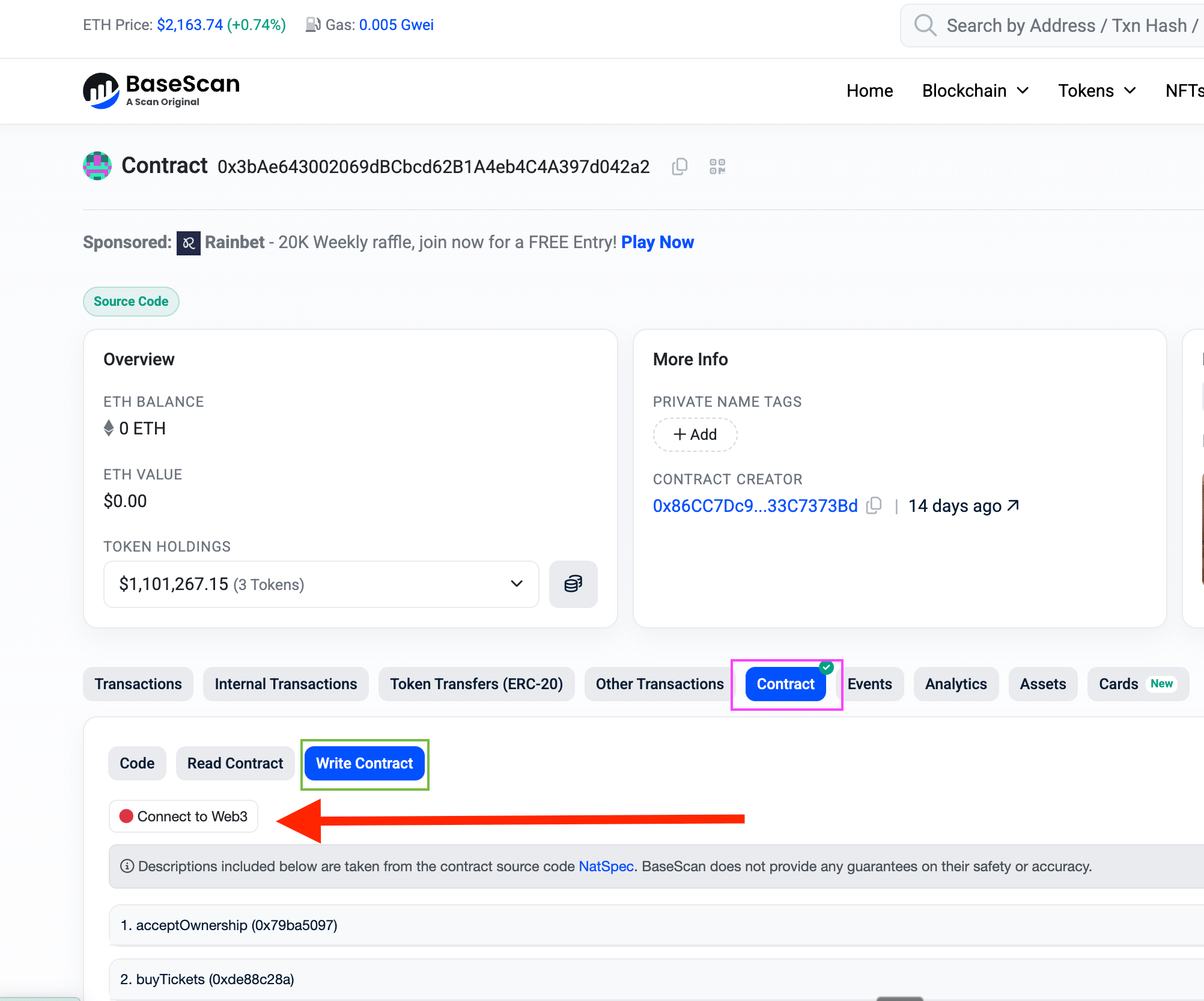
- Navigate to the contract address on Basescan
- Click the Contract tab (pink box), then Write Contract tab (green box). When approving USDC you will need to click on the Write as Proxy tab instead of Write Contract.
- Click Connect to Web3 (see red arrow in image above) and connect your wallet
- Find the function you want to call and enter the required parameters
Contract Addresses
All contracts are deployed on Base (Chain ID: 8453).Player Functions
Buy Tickets
Contract: Jackpot (Basescan) Function:buyTickets
Purchase lottery tickets for the current drawing.
Parameters:
_tickets: Array of ticket structs, each containing:normals: Array of 5 numbers (1 to ballMax, typically 1-30)bonusball: Single number (1 to current bonusballMax)
_recipient: Address to receive the ticket NFTs_referrers: Array of referrer addresses (can be empty[])_referralSplit: Array of split percentages in 1e18 scale (must sum to 1e18 if referrers provided)_source: Telemetry identifier (use0x0000000000000000000000000000000000000000000000000000000000000000)
- Connect your wallet
- In a separate tabIn a separate tab, Approve USDC spending for the Jackpot contract (1e6 per ticket)
Buy Random Tickets
Contract: JackpotRandomTicketBuyer (Basescan) Function:buyTickets
Purchase tickets with randomly generated numbers. The contract handles number selection for you using on-chain randomness.
Parameters:
_count: Number of random tickets to purchase_recipient: Address to receive the ticket NFTs_referrers: Array of referrer addresses (can be empty[])_referralSplitBps: Array of split percentages in 1e18 scale (must sum to 1e18 if referrers provided)_source: Telemetry identifier (use0x0000000000000000000000000000000000000000000000000000000000000000)
- Connect your wallet
- In a separate tab, tabIn a separate tab, Approve USDC spending for the JackpotRandomTicketBuyer contract (1e6 per ticket)
Claim Winnings
Contract: Jackpot (Basescan) Function:claimWinnings
Claim prizes from winning tickets. The ticket NFTs are burned upon claiming.
Parameters:
_userTicketIds: Array of ticket NFT IDs to claim
- Connect your wallet
- In a separate browser tab, find your ticket IDs (see below)
- Ensure the drawing has completed (tickets must be from a past drawing)
Option 1: Using the Megapot API (Recommended)
Query the API to get your winning tickets directly. You can either paste the URL into your browser or usecurl:
<YOUR_ADDRESS> with your wallet address.
If you have an API key (for higher rate limits), you can use curl with authentication:
claimed=false to see only unclaimed wins, which is useful for claim flows. You can paginate through results using the cursor parameter if you have many wins.
Example response:
ticket_id values and use them in the _userTicketIds array when calling claimWinnings.
Option 2: Using OpenSea + Smart Contracts
Navigate tohttps://opensea.io/<YOUR_ADDRESS>?collectionSlugs=megapot-tickets (replacing <YOUR_ADDRESS> with your wallet address) to view your Megapot Tickets. Clicking on one of the tickets should show the metadata below:
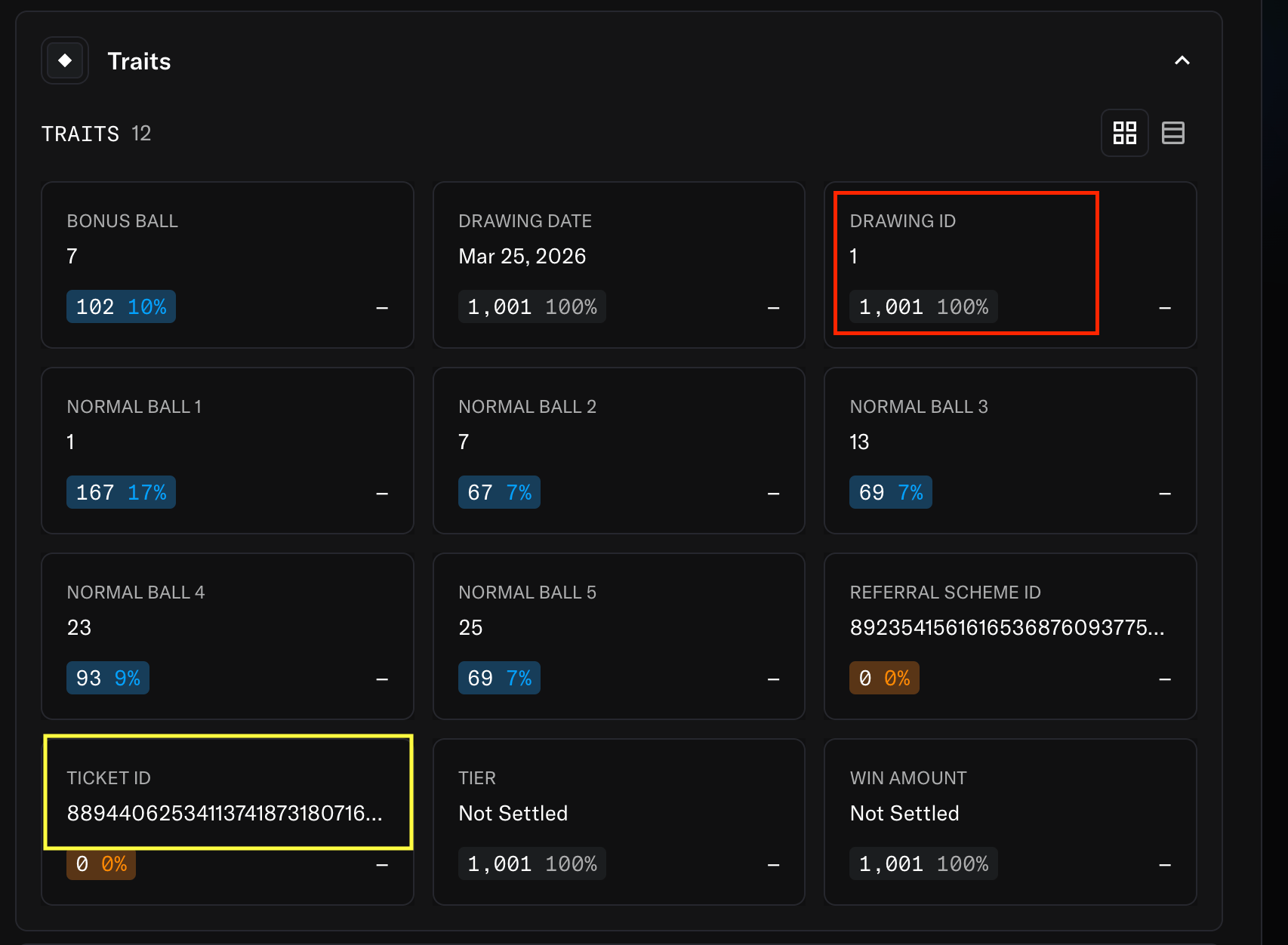
- Preferred for smaller number of tickets: For each ticket, locate the ticketId (yellow box). Add each id to the
_userTicketIdsarray that you will pass in toclaimWinnings. Optionally, you can use the next method as well. - Many tickets in one drawing: Get the
drawingIdfrom any ticket (red box), then go to the JackpotTicketNFT contract on Basescan and callgetUserTicketswith your address and the drawing ID to get all your ticket IDs for that drawing (see example below). Repeat for each drawing you participated in. It is recommended you claim one drawing at a time. - More than 75 tickets: Break up your
claimWinningscalls across multiple transactions to avoid running into gas limits.
Backer Functions
Deposit to Prize Pool
Contract: Jackpot (Basescan) Function:lpDeposit
Deposit USDC to back the prize pool and earn returns from ticket sales.
Parameters:
_amountToDeposit: Amount of USDC in wei (6 decimals, so 1000000 = $1)
- Connect your wallet
- In a separate tab, Approve USDC spending for the Jackpot contract
Initiate Withdrawal
Contract: Jackpot (Basescan) Function:initiateWithdraw
Begin the withdrawal process. Shares are moved to pending status.
Parameters:
_amountToWithdrawInShares: Amount of shares to withdraw (6 decimals, like USDC)
getLPShares on JackpotLPManager with your address.
Example withdrawing 100 shares:
Finalize Withdrawal
Contract: Jackpot (Basescan) Function:finalizeWithdraw
Complete a pending withdrawal and receive USDC. Call this after the drawing completes.
Parameters: None (uses your connected wallet address)
Before calling:
Emergency Withdrawal
Contract: Jackpot (Basescan) Function:emergencyWithdrawLP
Only available when emergency mode is enabled. Withdraws all LP positions immediately.
Parameters: None
Before calling:
Referrer Functions
Claim Referral Fees
Contract: Jackpot (Basescan) Function:claimReferralFees
Claim accumulated referral fees from ticket sales and winner payouts.
Parameters: None (uses your connected wallet address)
Before calling:
Check your balance first: Call referralFees on the Jackpot contract with your address to see your claimable amount.
Auto-Subscription Functions
Create Subscription
Contract: JackpotAutoSubscription (Basescan) Function:createSubscription
Set up automatic daily ticket purchases.
Parameters:
_recipient: Address to receive the tickets_totalDays: Number of days to subscribe_dynamicTicketCount: Number of random tickets per day_userStaticTickets: Array of static tickets (same numbers each day)_referrers: Referrer addresses_referralSplit: Referral split percentages (1e18 scale)_source: Telemetry identifier (use0x0000000000000000000000000000000000000000000000000000000000000000)
- Connect your wallet
- Calculate total cost:
totalDays × (dynamicTickets + staticTickets) × ticketPrice - tabIn a separate tab, In a separate tab, Approve USDC spending for the JackpotAutoSubscription contract
Cancel Subscription
Contract: JackpotAutoSubscription (Basescan) Function:cancelSubscription
Cancel your subscription and receive a refund for unused days.
Parameters: None (uses your connected wallet address)
Before calling:
Batch Purchase Functions
Create Batch Order
Contract: BatchPurchaseFacilitator (Basescan) Function:createBatchOrder
Create a batch order for purchasing many tickets at once.
Parameters:
_recipient: Address to receive the tickets_dynamicTicketCount: Number of randomly generated tickets_userStaticTickets: Array of user-defined tickets_referrers: Referrer addresses_referralSplit: Referral split percentages_source: Telemetry identifier (use0x0000000000000000000000000000000000000000000000000000000000000000)
- Connect your wallet
- Calculate total cost:
totalTickets × ticketPrice - tabIn a separate tab, In a separate tab, Approve USDC spending for the BatchPurchaseFacilitator contract
Cancel Batch Order
Contract: BatchPurchaseFacilitator (Basescan) Function:cancelBatchOrder
Cancel a pending batch order and receive a full refund.
Parameters: None (uses your connected wallet address)
Before calling:
Read Functions
These view functions help you check state before making transactions:Approving USDC
Many Megapot functions require you to approve USDC spending before calling them. This is a standard ERC-20 pattern that allows the contract to transfer USDC on your behalf. USDC on Base:0x833589fCD6eDb6E08f4c7C32D4f71b54bdA02913
How to Approve
- Go to the USDC contract on Basescan
- Click the Write as Proxy tab
- Connect your wallet
- Find the
approvefunction - Enter the parameters:
spender: The Megapot contract address you want to interact with (see table below)value: The amount in USDC wei (6 decimals)
- Click Write and confirm the transaction
Amount Examples
Which Contract to Approve
Transferring USDC from a Smart Contract Wallet
If you created a wallet through the Megapot app, you have a smart contract wallet. To transfer USDC out of this wallet using Basescan, you’ll need to use theexecute function on your wallet contract.
Prerequisites
- Export your private key from the Megapot app
- Import the key into a browser wallet (e.g., MetaMask, Rabby, or Coinbase Wallet)
- Navigate to your smart contract wallet address on Basescan (e.g.,
https://basescan.org/address/YOUR_WALLET_ADDRESS)
Creating the Transfer Calldata
To transfer USDC, you need to encode thetransfer(address,uint256) function call. You can use this tool to generate the calldata:
- Go to HashEx ABI Encoder
- Select “Auto-parse” and enter:
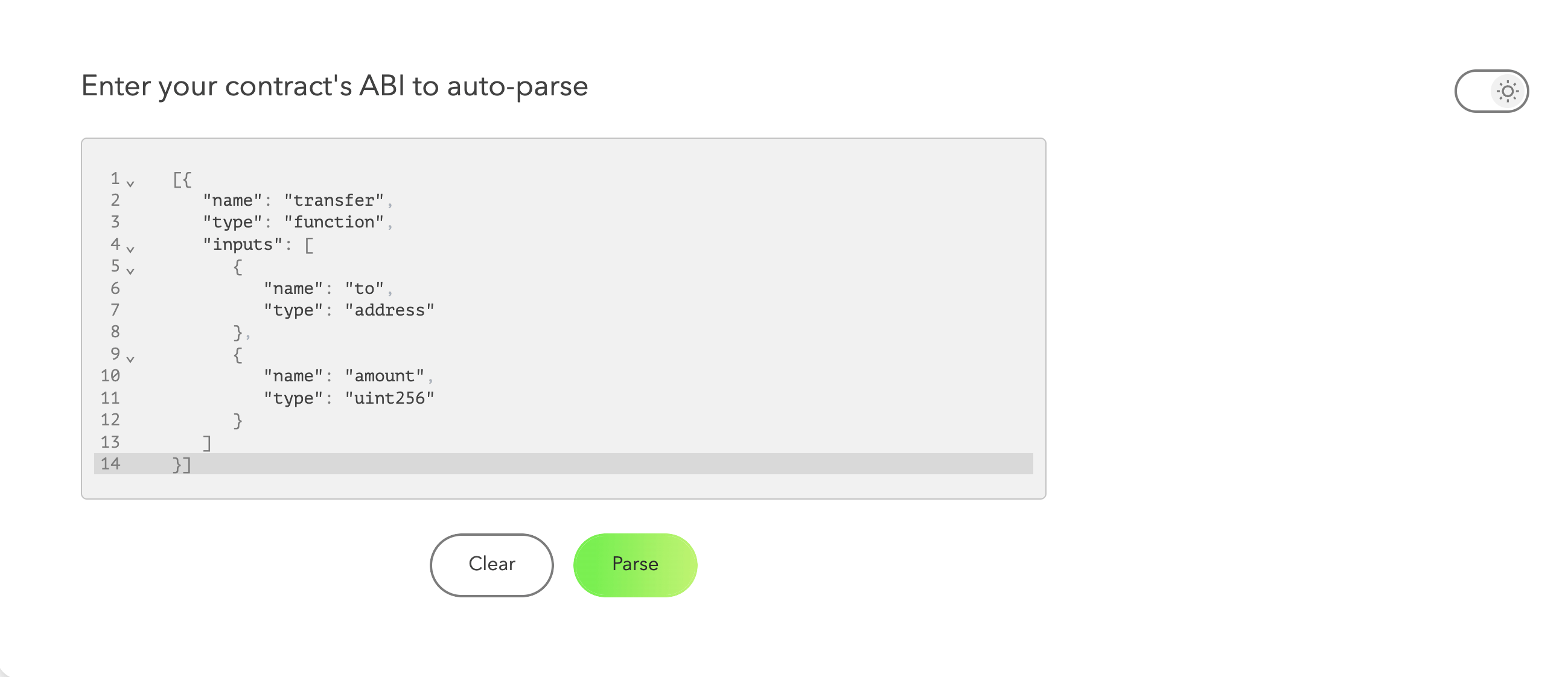
- Click
Parseand selecttransfer(address,uint256)from the drop down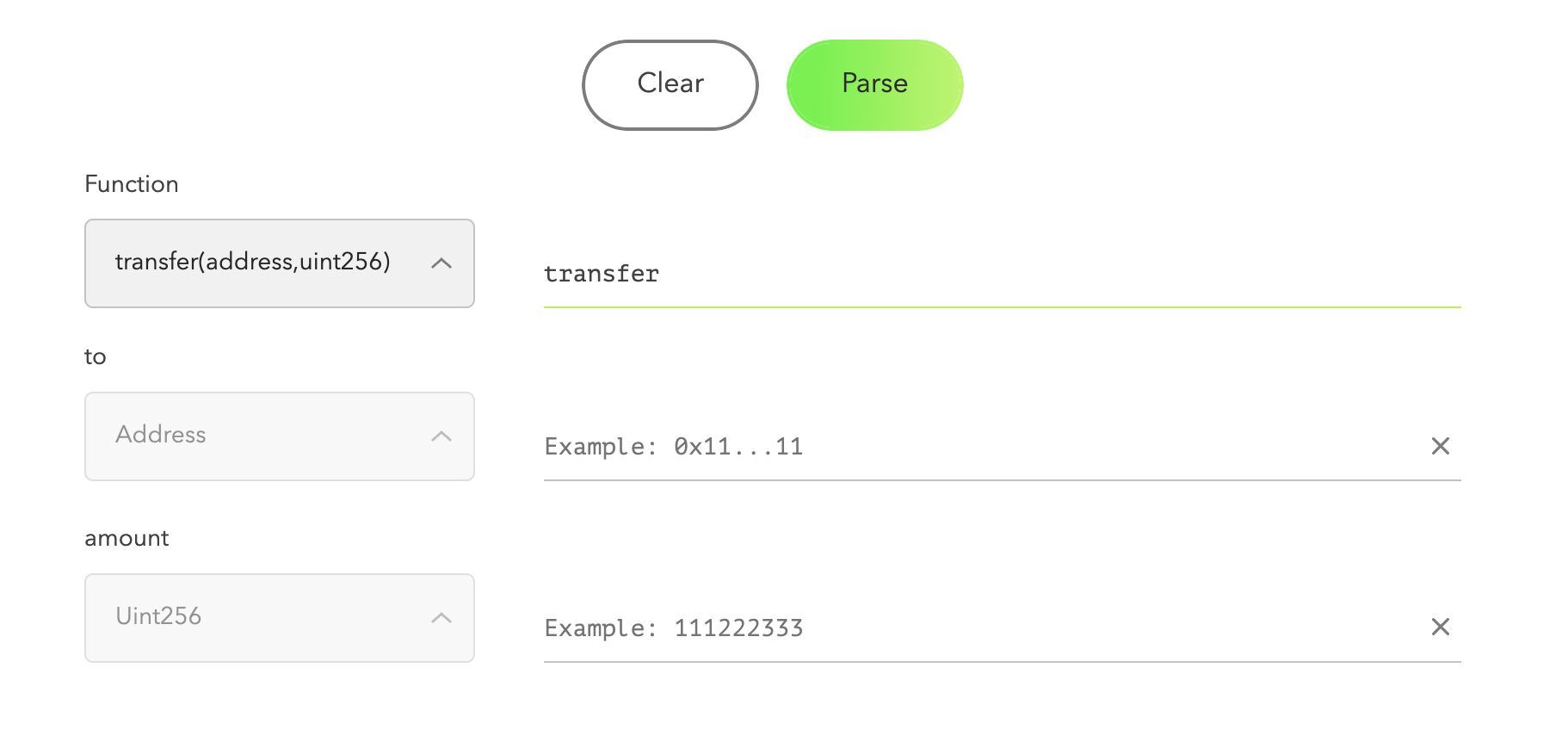
- Fill in the parameters:
- address: The destination wallet address (where you want to send USDC)
- uint256: The amount in USDC wei (6 decimals, so
1000000= $1)
- Copy the resulting encoded data (it will start with
0xa9059cbb...)
Executing the Transfer
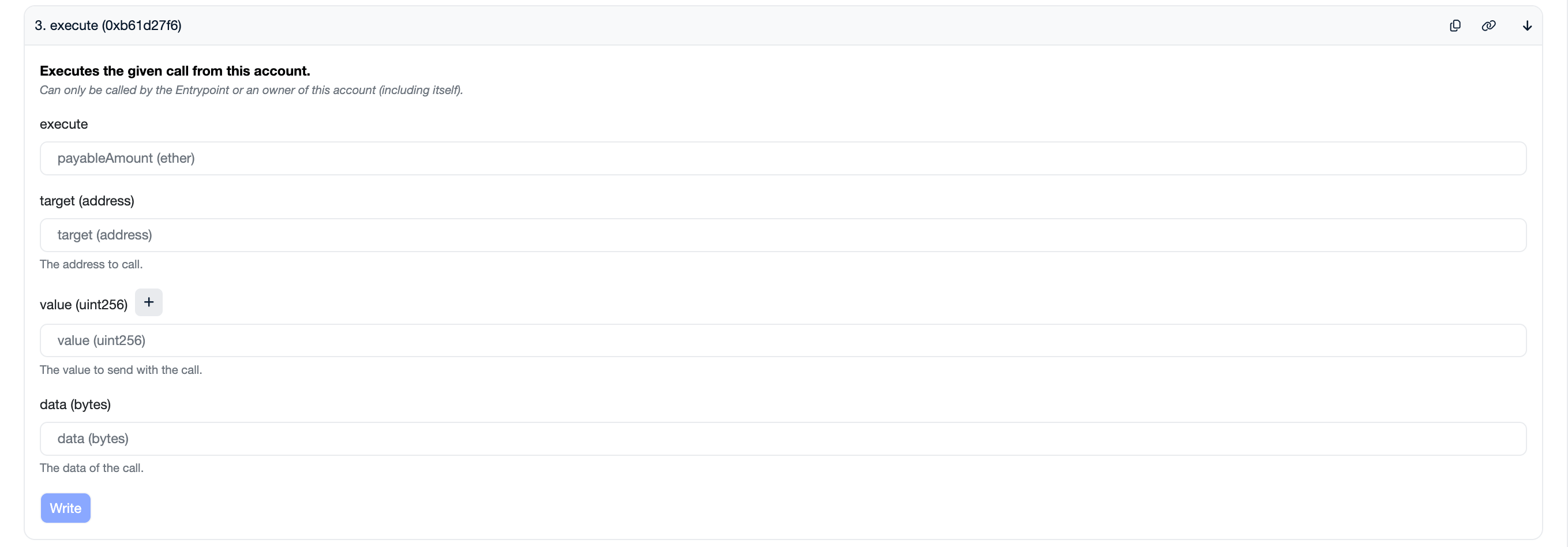
- On your smart contract wallet’s Basescan page, click Contract → Write Contract as Proxy
- Connect your browser wallet (the one with your exported private key)
- Find the
executefunction and enter:- payableAmount:
0(USDC transfers don’t require ETH) - target:
0x833589fCD6eDb6E08f4c7C32D4f71b54bdA02913(USDC contract on Base) - value:
0 - data: The encoded calldata from the previous step
- payableAmount:
- Click Write and confirm the transaction in your wallet
Example: Transferring $100 USDC
To send $100 USDC to address0x1234...5678:
- Generate calldata with:
- address:
0x1234567890123456789012345678901234567890 - uint256:
100000000(100 × 10^6)
- address:
- The encoded data will look like:
- Use this as the
dataparameter in theexecutefunction